button-outline
Interactive elements with outlined styling that create subtle visual hierarchy and clear action affordance for primary and contextual user interactions.
On this page
This documentation is a work in progress and may contain incomplete or outdated
information. If you have any feedback or suggestions, please open an issue on GitHub.
Technical specifications and design system values that define the visual and structural properties of outline button components. These specifications ensure consistent implementation across design tools and development environments.
Legend:
- Brackets (
[]) denote a component variant placeholder. - Full emphasis indicates a value specific to that variant.
- Dimmed indicates a value unchanged from the default variant.
Outline Buttons
Specifications for outline button elements including measurements, colors, typography, and styling attributes. These values define the core appearance and behavior properties for each button variant.
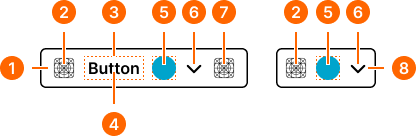
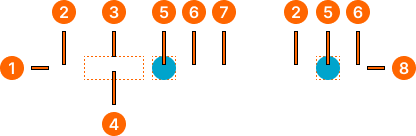
1
Outline Button
- state:
- idle
- minHeight:
- size.button.[size]-main
- minWidth:
- size.button.[size]-main
- verticalPadding:
- space.button.[size]-padding-y
- horizontalPadding:
- space.button.[size]-padding-x
- itemSpacing:
- space.button.[size]-gap
- fill:
- color.context.[context].transparent-color
- borderColor:
- color.context.[context].base-color
- borderRadius:
- borderRadius.button.[size]
- borderWidth:
- borderWidth.context.large
- state:
- hover
- minHeight:
- size.button.[size]-main
- minWidth:
- size.button.[size]-main
- verticalPadding:
- space.button.[size]-padding-y
- horizontalPadding:
- space.button.[size]-padding-x
- itemSpacing:
- space.button.[size]-gap
- fill:
- color.context.[context].base-color
- borderColor:
- color.context.[context].transparent-color
- borderRadius:
- borderRadius.button.[size]
- borderWidth:
- borderWidth.context.large
- state:
- press
- minHeight:
- size.button.[size]-main
- minWidth:
- size.button.[size]-main
- verticalPadding:
- space.button.[size]-padding-y
- horizontalPadding:
- space.button.[size]-padding-x
- itemSpacing:
- space.button.[size]-gap
- fill:
- color.context.[context].dim-main
- borderColor:
- color.context.[context].transparent-color
- borderRadius:
- borderRadius.button.[size]
- borderWidth:
- borderWidth.context.large
- state:
- disabled
- minHeight:
- size.button.[size]-main
- minWidth:
- size.button.[size]-main
- verticalPadding:
- space.button.[size]-padding-y
- horizontalPadding:
- space.button.[size]-padding-x
- itemSpacing:
- space.button.[size]-gap
- fill:
- color.context.[context].transparent-color
- borderColor:
- color.context.[context].fg-slight
- borderRadius:
- borderRadius.button.[size]
- borderWidth:
- borderWidth.context.large
2
Icon Start
- state:
- idle
- height:
- size.button.[size]-icon
- width:
- size.button.[size]-icon
- fill:
- color.context.[context].base-color
- state:
- hover, press
- height:
- size.button.[size]-icon
- width:
- size.button.[size]-icon
- fill:
- color.context.[context].contrast-color
- state:
- disabled
- height:
- size.button.[size]-icon
- width:
- size.button.[size]-icon
- fill:
- color.context.[context].fg-slight
3
Label Frame
Text only buttons require increased horizontal padding.
- horizontalPadding:
- space.button.[size]-nudge
4
Label Text
- state:
- idle
- fill:
- color.context.[context].base-color
- typography:
- font.button.[size]
- state:
- hover, press
- fill:
- color.context.[context].contrast-color
- typography:
- font.button.[size]
- state:
- disabled
- fill:
- color.context.[context].fg-slight
- typography:
- font.button.[size]
5
Badge Frame
- state:
- idle, hover, press
- opacity:
- opacity.level.solid
- state:
- disabled
- opacity:
- opacity.context.fg-slight
6
Caret Icon
- state:
- idle
- height:
- size.button.[size]-caret
- width:
- size.button.[size]-caret
- fill:
- color.context.[context].base-color
- state:
- hover, press
- height:
- size.button.[size]-caret
- width:
- size.button.[size]-caret
- fill:
- color.context.[context].contrast-color
- state:
- disabled
- height:
- size.button.[size]-caret
- width:
- size.button.[size]-caret
- fill:
- color.context.[context].fg-slight
7
Icon End
- state:
- idle
- height:
- size.icon.glyph.[size]
- width:
- size.icon.glyph.[size]
- fill:
- color.context.[context].base-color
- state:
- hover, press
- height:
- size.icon.glyph.[size]
- width:
- size.icon.glyph.[size]
- fill:
- color.context.[context].contrast-color
- state:
- disabled
- height:
- size.icon.glyph.[size]
- width:
- size.icon.glyph.[size]
- fill:
- color.context.[context].fg-slight
8
Outline Icon-Button
- state:
- idle
- minHeight:
- size.button.[size]-main
- minWidth:
- size.button.[size]-main
- verticalPadding:
- space.button.[size]-padding-y
- horizontalPadding:
- space.button.[size]-padding-x
- itemSpacing:
- space.button.[size]-gap
- fill:
- color.context.[context].transparent-color
- borderColor:
- color.context.[context].base-color
- borderRadius:
- borderRadius.button.[size]
- borderWidth:
- borderWidth.context.large
- state:
- hover
- minHeight:
- size.button.[size]-main
- minWidth:
- size.button.[size]-main
- verticalPadding:
- space.button.[size]-padding-y
- horizontalPadding:
- space.button.[size]-padding-x
- itemSpacing:
- space.button.[size]-gap
- fill:
- color.context.[context].base-color
- borderColor:
- color.context.[context].transparent-color
- borderRadius:
- borderRadius.button.[size]
- borderWidth:
- borderWidth.context.large
- state:
- press
- minHeight:
- size.button.[size]-main
- minWidth:
- size.button.[size]-main
- verticalPadding:
- space.button.[size]-padding-y
- horizontalPadding:
- space.button.[size]-padding-x
- itemSpacing:
- space.button.[size]-gap
- fill:
- color.context.[context].dim-main
- borderColor:
- color.context.[context].transparent-color
- borderRadius:
- borderRadius.button.[size]
- borderWidth:
- borderWidth.context.large
- state:
- disabled
- minHeight:
- size.button.[size]-main
- minWidth:
- size.button.[size]-main
- verticalPadding:
- space.button.[size]-padding-y
- horizontalPadding:
- space.button.[size]-padding-x
- itemSpacing:
- space.button.[size]-gap
- fill:
- color.context.[context].transparent-color
- borderColor:
- color.context.[context].fg-slight
- borderRadius:
- borderRadius.button.[size]
- borderWidth:
- borderWidth.context.large